Try These 6 Best Android Games to Play on Your TV with Chromecast

Some of the best Android games to play on your TV with Chromecast that your family and friends will surely enjoy.

Ways on How to Minimize Your Business Expenses

Find out what are the ways to minimize your business expense. Important things business owners should know to spend less.

HP Pro Slate Tablet Review: HP's Giant Android Tablet

Let's take a closer look at its specs, as well as its features, to give you a better visibility on the HP Pro Slate 12 tablet.

A Guide to Getting Better Tech Support Service

Getting the assistance you need by calling customer service can be a miserable experience, but when it comes to bite the bullet and give them a ring, you may want to check out these tips to make it go as smoothly as possible.

Friday, January 10, 2014

Get Familiar With the Fleksy App

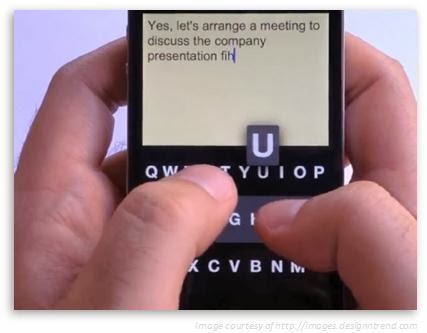
A new app is out and about that lets you type on your smartphone without looking at your screen. Meet Fleksy, a keyboard app now designed for both iOS and Android devices that's currently making trends in the app world since it was released. It is free for iOS users while for Android, you can download and use it for free on the first month, and then a one-time fee of $3.99 after. But what exactly is Fleksy and how do you use it?


Overview

According to Flexsy.com, Fleksy is an application that replaces your device's on-screen keyboard. Its features include a familiar QWERTY layout, sophisticated prediction, an autocorrect engine, a larger typing area where you can either use the traditional buttons like the spacebar or master the app's unique swipe-based system to space, delete, capitalize, and punctuate. This is why Fleksy claims that it can do several things better than iOS 7's default keyboard.
The following apps now implement the Fleksy keyboard:
  • Launch Center Pro - an application launcher with shortcuts for frequently accessed tasks
  • GV Connect - a Phone and SMS client for Google Voice users
  • BlindSquare - combines location and FourSquare information to assist virtually-impaired users in their daily lives
  • WordBox - clean and simple text editor
However, getting this app will not replace your entire keyboard experience on your device. Fleksy can only be used in individual apps and only for keyboards which app developers choose to support. Currently, Fleksy continues to work with other app developers for future integration of its keyboard to their apps.

How to Use It


First, install the Fleksy app from the iOS or Google Play Store, and then launch it on your device. Start typing as you would normally do on a regular keyboard, without worrying if you make a typo error. You will notice that the app will take care of the mistakes for you with its autocomplete engine. Now if you want to insert a space in between words or delete a word, you don't really need to look on the screen to do that. Just swipe to the right to insert a space or swipe to the left to delete a text or character. Swipe twice to the right if you need to insert a punctuation mark, such as a period or a comma, and then swipe down if you want to scroll through its suggested entries.

The app's excellent prediction enables it to guess the correct word that you want to type. It also has an ability to turn its keyboard to completely invisible if in case you need more typing space. Just tap the area where you think the letters are located as if the visible keyboard is still there and the results will still be accurately the same.


Tuesday, December 3, 2013

A Sneak Peak at car Force One: The Most High Tech Cab in New York Today

If you happen to be in New York, there's a good chance you'll get to see the hottest and coolest taxi cab there is...it's none other than the Car Force One. Sounds intimidating, right? And no, it's not the official car of President Barack Obama however, it is one ride that's fit for His Excellency. The Car Force One, which is founded and currently owned by Ishai (last name not revealed), is a luxury car service that transports you around New York along with tons of up-to-date amenities with no additional charge.

According to Ishai, his company's goal is to achieve full customer satisfaction. “My company is not about the car, it’s about the service. It’s for the clients,” said Ishai. Since July 2009, Ishai has been a cab driver and has been developing his vehicles with the help of his creative team. So what's in store with the most high-tech cab in New York? His 2011 Chevrolet SUV's loaded with gadgets such as an Xbox 360, which will be upgraded to Sony PlayStation 4 once it goes available, a 23-inch Samsung HD monitor, cable TV with premium HD channels, a Blu-Ray player, 4G Internet connection, a fully functioning laptop, refreshments, and the list goes on.


Ishai created the Car Force One with 3 visions in mind -- convenience and comfort, multimedia entertainment, and a fully-equipped mobile office. These are major plus points, especially for people in New York, who always do business even when traveling and wants everything done in a jiffy. And if you still can't get enough of the cool gadgets that you can possibly experience with this vehicle, here's a more elaborate list.

Convenience and Comfort
Multimedia Entertainment
Mobile Office
Chargers for iPhone 4, 4s, 5, 5c, 5s, Samsung and BlackBerry phones on every side/seat
23-inch full HD 1920 x 1080p monitor that’s hooked up for 5 different uses:
 - Internet, Blu-ray movies, live cable TV, gaming console and pictures and videos from SD card reader.
Fully functioning laptop hooked up to 23-inch monitor, wireless keyboard and mouse
Gaming console (Xbox 360 for now, he has already ordered PS4)
4G Wi-Fi that clients can connect to on their own devices
2 Power and 2 USB outlets in front 
Samsung Blu-ray player
3 mobile printers:
- 4 x 6 photo printer
- an all-in-one scanner/printer
- an HP OfficeJet printer
Climate control unit to adjust seat heaters, fan speed, car temperature and radio station tuner
Live cable TV (Time Warner) with premium channels such as Disney and HBO
Full-size wireless keyboard (held in place with Velcro)
Remote controls throughout car to adjust lighting on/off and dimming
2 headrest monitors hooked up to Blu-ray player
Wireless mouse (snaps in place with magnetic holder) 
Phone holders near charging cables on sides of car
Theater surround-sound system
Adjustable table as a writing surface that holds the keyboard and mouse
Cup holders
More than 200 titles of Blu- ray movies in a 2TB hard drive, an additional 30 titles for kids
SD card reader for memory card file transfer
Overhead vanity/”makeup” mirrors for every seat
Up-to-date magazines and newspapers

Mobile “bathroom,” as a client called it, side dock with:
- Victoria’s Secret lotions and colognes
- hand sanitizers
- Wet Ones to go
- Kleenex to go
Lights of 6 different colors:
- green in front for the flowers,
- purple
- blue
- red in third row for “It’s like Amsterdam back there”
- modified white interior car lights
- yellow adjustable reading light
- Strobe/party lights in bottom of middle row

3 coolers (2 for now) that serve as mini-bars, offering cold drinks such as:
- bottled water
- orange juice
- apple juice
- Diet Coke
- Sprite
- Coors Light
(Plans to add fruit salad cups)


Mobile baby station with:
- bottle warmer
- baby wipes warmer
- paper towels


Adjustable individual reading lights


Flowers (on the weekends)


Neck pillows, sleeping mask


2 full-size umbrellas, adding 2 smaller ones


Infant and toddler car seats and boosters


- First aid kit
- Emergency seat belt cutter
- Window breaker
- Fire extinguisher


Cleaning at car wash every 2 weeks


Dying to get a ride in the Car Force One? Reservations start at $45 for a trip from the Upper West Side to Wall Street, while shorter distances start at $35. Not a bad deal since the same trip will set you back some $30 in a regular yellow cab during moderate traffic, including a 20% tip. According to Ishai, a minimum fee for reservations is imposed because of the commitment it makes, as well as the opportunity cost involved. The company also doesn't charge cancellation or change fees. For regulars, he offers better rates and sometimes even offers free rides for short trips when he's not busy during his in-between client time.

Here's the catch, though. If you are planning to make a reservation of the Car Force One today and expect to get a ride the next day, then you're in for a huge disappointment. Making a reservation of the Car Force One should be done as early as possible because of its very tight schedule. The company receives bookings for March as early as 6-9 months before the book date. Most customers hire the company's high-tech vehicle for airport and business pickups.

You can make an online reservation by going to the Car Force One website, log in using the "carforceone" username and "president" as the password. You will be required to open an account for 15% off posted rates. Mr. Ishai is now planning of upgrading his gadgets with those that will be featured in the Consumer Electronics Show in Las Vegas, which he will be attending this coming January. Some of the upgrades he's planning to make are:
  • A 4K or 3D monitor (without glasses)
  • Wireless phone charging dock
  • A Karaoke machine
  • Heated or cool cup holders
  • A mousepad that can be used on the lap 
But what makes the Car Force One extra special, aside from its cool gadgets and complete amenities, is the reliability and customer service that the customer gets every time they avail of the company's service. Because of this, Ishai's regular customers grow in numbers, and he also gets to be their confidant for some! Although, for people who gets to see this awesome cab for the first time, it's the up-to-date technology that it offers is mainly the head-turner of New York's one and only, Car Force One.


Thursday, November 28, 2013

Awesome Gadgets That Can Make You Stay Fit

Admit it, we all love gadgets. Whenever a new one comes out, it becomes a trend on all forms of media. Whether we want to use it for entertainment, surfing, music, health, or simply just to brag it around to your friends, gadgets catch our attention one way or another. Gadgets that help you improve and monitor your health are now widely used simply because they are designed to help make the best out of your workout sessions, track your health progress, and have fun while sweating it out at the same time. Here are some health-oriented gadgets that all "calorie-counters" and "gym go-ers" will surely like.


Amiigo Fitness Bracelet
This is a 2-in-1 fitness bracelet that is designed to track and recognize every workout that you perform. The device has 2 parts: one is worn as a bracelet, and the other one on your shoe. It tracks your heart rate, blood oxygen level, and skin temperature. Other features include wireless charging and it's fully waterproof. Information on your activity is sent back to your iOS or Android device via Bluetooth connection. Price: $99 - $119


Fitbit Aria Wi-Fi Smart Scale
The Fitbit Aria is an ideal gadget for people who are regularly monitoring their weight. It is a bathroom scale that measures your weight and body fat, and syncs the stats to your Fitbit Web account where you can log and track your physical fitness activities, food intake, and even how much sleep you are getting. You can also use the data collected by the Fitbit Aria scale to other Fitbit apps. It has a stylish and low profile design with easy-to-see readouts. This device can be used by the entire family since it can support up to 8 users. Price: $129.95


Sportiiiis
For those who love cycling, check this out. Sportiiiis is a Heads Up Display (HUD) and audio system that provides instant visual feedback on your workout and racing data (Heart Rate, Cadence, Power, Speed, Pace, and other ANT+ compatible data). It has multi-colored LEDs positioned in your peripheral vision, which can be easily attached to virtually any pair of glasses. It's also included with a heart rate monitor and built-in speaker that gives out voice prompts with detailed levels of performance. Just do a simple tap on the unit and you will get a verbal update of your current workout, so it's less distracting and will still keep you focused on your track. Sportiiiis is also compatible with ANT+ enabled devices so that you can easily integrate it with your current training tools. Price: $149


Sensoria Smart Sock
Sensoria Smart Sock is another product innovation that allows you to track your activity, stride, speed, distance, calories, and most importantly, how your foot lands on the ground. It's specially designed for runners to help them determine how fast and how far they're running, and how to improve their running performance at the same time. It's ideal for runners, athletes, and personal trainers because it greatly helps in improving their running performance and reduce the risk of possible injuries. The Sensoria technology integrated in this sock provides foot landing technique analysis to detect heel pressure, and stride cadence to improve the wearer's performance. Imagine an ordinary sock with an anklet sensor and a virtual coach mobile app to provide visual analysis is considered a revolutionary way to stay safe and fit. Price: $119


BodyMedia FIT
Looking for an added boost in your weight loss program? Try the BodyMedia FIT system. It consists a wearable armband that measures the calories burned, steps taken, nutritional analysis, sleep quality, and monitors your exercise intensity. It also includes a free BodyMedia FIT app for your smartphone to provide you with real-time data on your workout sessions via Bluetooth connection with the armband. You can also log your food intake and create customized workouts using its Online Activity Manager. It's another great way to know your body, be healthy, and improve your lifestyle. The BodyMedia FIT system offers a 3-month free trial period. Price: $119.99


So lose that bulging tummy with the help of these cool fitness gadget companions.

Saturday, November 23, 2013

Convenience At One Call


Can you imagine living a life in a 21st century without Internet? I think most of us will have a hard time managing things without it. Just within the comfort of your home, you can pay bills and earn on the other hand. One click on the mouse will start your day right because you will be able to communicate to your loved ones wherever you are!

I realized how important it is in day-to-day basis when I lost internet connection on my laptop and I need to meet the deadlines, got to pay the bills and send important documents using email. I don't know where do I start and I feel helpless. Since I need the internet so bad, I tried to fix it on my own. For a non-techie consumer like me, I spent hours dealing with the concern by checking a few articles. I wish I knew someone that I can talk to and it should have been fixed by now. Will I be able to do this? Do I have all the time to spend for troubleshooting? Momentarily, I have to find a way to access the internet; go online directly to the modem. On my perspective, it may be with my laptop but I'm not sure. Though I was able to get online, it is not convenient for me to leave my laptop hardwired to the modem and this is not the network setup that I want to have.

As much as possible, I don't want to bother calling for tech support and not sure if they are available anytime or if they can fix my concern. I believe this is the best time. It's in the middle of the night and I can't help thinking how to solve this. I tried to search for a tech support company who has highly skilled technicians and will be able to assist me with this matter. I was able to talk to an engineer and he found out that there is a need for a driver update for the wireless adapter of my computer. Never thought of that though since I just had it for 2 years, in less than an hour, problem has been fixed!

For an internet-connected home setup, we should be at any time worry free and at ease that someone can lend a helping hand to provide resolution for all homenetworking concerns.


Have you experienced the same situation like mine? Please feel free to share it.

Friday, November 8, 2013

For the Best Holiday Gift Ideas Go for Online Shopping and Discounted Prices


This holiday season, instead of going to retail stores searching for holiday gifts for your family and friends, or reading about those dreary “gift idea” lists that only promote a limited number of products, why not go online shopping this year for a change.

Online shopping stores carry many high quality and top branded products. They offer the best slashed, massively discounted, and bargain prices that are guaranteed on all products for all customers. As soon as you click on a homepage of any online shopping store, you will immediately see a wealth of product categories and listings with descriptions without the usual advertising.

Some examples of highly discounted items as gift ideas during the Christmas holidays include:

§  Universal chargers like emergency mobile chargers, mobile phone and digital camera chargers, iPod, iPhone USB capable chargers – great gift ideas for people who always need backup chargers.
§  First aid kits and boxes of any mix – great for dads or big brothers who need it for their workshops and garage.
§  Digital cameras, lenses, and accessories – great for those into hobby photography.
§  Notebooks, laptops, and accessories – for the techies and not so techie, or for mom or sister who always needed one, or check out these holiday gift ideas for your techie family.

Online shopping stores normally search out quality products by directly importing products from overseas factories, purchasing products in bulk from local suppliers, or buying products that are almost out of season. The products are very high quality and are then sold at greatly reduced prices, usually lower than retail prices of the same products even in large department stores.

Online shopping stores also guarantee that products bought from them are all under warranty and credit guarantee:

§  Products shown at online shopping sites are exactly the same brand and color, with a wide array to choose from, aside from those shown.
§  Online shopping sites have more stocks than most reputable retail stores.
§  Most retail stores do not have a credible online site established.

Since the purchase of any item includes the delivery, most online shopping stores advise customers to make purchases before December 10 so delivery can be made just before Christmas day.


Are you ready for the holiday season? Please feel free to share your gift ideas.

Thursday, November 22, 2012

Five Lesser Known Ways of Securing Your Wireless Network


When we buy a wireless local area network (WLAN) equipment, we become so excited of using it right away that we always forgot one important element in the process - security.  The widespread use of wireless networks also means there are also a number of potential network threats lurking within range of your home or office WLAN. Thus it really pays off to take a few couple of minutes to configure the security features of your wireless router or access point.

To help you make sure that no one can take advantage of your system, here are the top five things you can do to protect your wireless network:

Secure the router or access point administration interface

All wireless routers and access points come with a default administration password you need to change. Some manufacturers’ uses “password” or their name as default password and some do not have a password at all making you a very easy target to hackers. So as soon as you set up your WLAN, change the default password immediately. Just be sure to write down the new password for future reference as you will not be using them very often.

Enable WPA encryption instead of WEP

WEP or wired equivalent privacy encryption has widely known weaknesses that make it relatively easy for up-to-no-good users to crack the encryption and access your network. A better way to secure your WLAN is to enable your Wi-Fi protected access (WPA) as your password is not limited to 0-9 and A-F characters as with the WEP.

However, WEP is better than nothing

If your device only supports WEP encryption, this is not a reason to skip the encryption entirely because despite of its flaws, WEP is still far superior to having no encryption at all! Just be sure not to construct an easy-to-guess password like a series of consecutive numbers or your full name.  If you can reset your encryption every week do so.

Try not broadcast your SSID

Most WLAN routers and access points automatically and continually broadcasts your SSID or service set identifier. This makes you visible to all wireless network or system within range. Turning off the SSID will make you invisible to your neighbors and passers-by.

Reduce your WLAN transmitter power

Reducing your WLAN transmitter power means reducing the range of your signal. Though, you cannot entirely fine-tune your signal that it will not leak outside your home or office but limiting your signal reach minimizes the opportunity for outsiders to access your WLAN. The only downside is that this feature is only available to a handful of WLAN routers or access point products.

If you need more information or better yet a partner to help you install and protect your wireless system as well as have someone to go to when bad turns to worst in your computing life, we at SUPPORTrix can be of great service to you.

Call us at 1877 787 8749 to talk to one of our remote computer support professionals or know us better at http://www.supportrix.com/

Wednesday, November 14, 2012

Taking Business Into the Next Level: The Benefits of Virtual Assistance


A growing number of business owners are hiring virtual assistants in order to save time and money. A virtual assistant can handle all administrative, marketing clerical and even social media tasks for any businesses. 

Unlike having the traditional assistant, outsourcing virtual office work uses their own equipment and resources, therefore one will no longer have to worry about finding materials for the business to grow. This service is perfect for handling any periodical or seasonal projects that any business firm may have. 

Because of the outstanding benefit that virtual assistance can offer, I personally tried this service and it really works. I am able to save a lot of expenses such as payroll taxes and health insurance and I no longer have to buy additional office supplies. 

Hiring a personal virtual assistant feels like having a trusted partner whom I can delegate some tasks that take away my valuable time. A Virtual assistant is committed to me and to my business. 

What is good about this service is that the virtual assistant will provide an up to date trend in technology and can help increase productivity and develop new marketing strategies that will surely help my business stand out from the rest. 

The new trend of hiring virtual assistant has given me the chance to hire a professional who can send out requested information to my customers, set up meetings and handles billing and accounting. This type of service is also good for those who run businesses online. 

Speaking of online business, of course you cannot avail of this service if you do not have an internet connection with you. The internet is your only way to communicate with your virtual assistant so if you will experience some sort of network problem, you can avail of SUPPORTrix remote computer support service.

SUPPORTrix provides 24/7 online assistance making sure that you are able to enjoy a trouble free computer as you communicate with your virtual assistant. 

Should you need to know more about SUPPORTrix, feel free to visit them at their official website today!