Try These 6 Best Android Games to Play on Your TV with Chromecast

Some of the best Android games to play on your TV with Chromecast that your family and friends will surely enjoy.

Ways on How to Minimize Your Business Expenses

Find out what are the ways to minimize your business expense. Important things business owners should know to spend less.

HP Pro Slate Tablet Review: HP's Giant Android Tablet

Let's take a closer look at its specs, as well as its features, to give you a better visibility on the HP Pro Slate 12 tablet.

A Guide to Getting Better Tech Support Service

Getting the assistance you need by calling customer service can be a miserable experience, but when it comes to bite the bullet and give them a ring, you may want to check out these tips to make it go as smoothly as possible.

Sunday, August 10, 2014

Polaroid XS100i Wi-Fi Action Camera Review: Affordable Waterproof Camera for the Whole Family


As an upgrade from last year's XS100 model, the Polaroid XS100i has an added Wi-Fi with iOS and Android apps to remotely control the camera, view and share photos, as well as adjust its settings according to your preference. At an attractive price of $179.99, you get the waterproof camera plus tons of its accessories, which are pretty useful for any kind of action-filled activity.

Features and Design

A great strategy for action cam makers like Polaroid to attract buyers is to equip their product with lots of accessories. The camera has a standard, but made of plastic, 1/4-20 tripod mount at the bottom. The mounts included, however, use a quick-connect clip system. The clip screws into the the camera's tripod socket, which then slides and locks into a mount. The package also includes ball-and-socket mounts that can be used on helmets (which is perfect for biking, surfing, or any other activity requiring hands-free operation) and handlebars.

The camera's mounting system is the same for other models such as the Monoprice's MHD action cam and iON's Air Pro, so it's pretty easy to look for a compatible mount, if ever the need arises in the future.


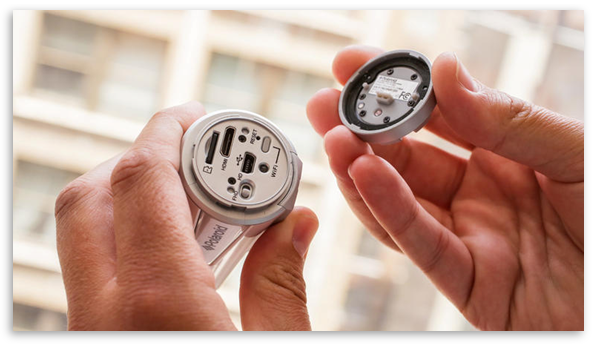
The camera has a compact and bullet-shaped body, measuring 4.3 inches long by 1.7 inches high by 1.7 inches wide (108 by 42 by 42.4 mm) and weighs 4.8 ounces (136 g). Its body doesn't need any waterproof casing (because it already is!), allowing you to dive up to 30 feet (10 meters). Its locking twist-off cap protects the microSDHC slot, the mini-HDMI, and then mini-USB ports from getting sand and water. Being able to use it on all types of environment -- sand, rain, or snow, is one of the reasons why this is a great piece of equipment. There is also a switch for recording in full HD or 720p resolution.

Battery Life
One thing you won't have access to is its battery since it's built-in -- not sure if this is something that matters to the user or not. Battery life is approximately to last about 2.5 hours, though it will unlikely last that long if you're recording at 1080p resolution and with the Wi-Fi turned on. If the camera is going to be used in mixed settings, expect the battery to last between 1.5 - 2.5 hours for straight recording.

How to Use It
Operating the camera is pretty straightforward. For video recordings, just slide the switch located at the top forward, and you will feel the camera vibrate after a few seconds to indicate that it's starting to record. You can also tell if it is by the led indicator above the REC label. If you slide the switch back to its previous position, the camera will vibrate again to notify you that it has stopped recording.


Another button that can be found is the power/shutter release in front of the switch. Making a long press on the switch will turn on the camera, which allows the camera to start recording once you slide the switch forward. If you want to take a photo, simply make a short press on the button. The camera stores small applications on the microSD card (if you have one inserted) for changing settings. Connect the camera either to a Mac or Windows computer, launch the software, and you will be able to select the camera's recording resolutions, including the picture resolution that you want to use.

The software can also be used to turn on and off the camera's auto orientation feature, which automatically rotates your video 180 degrees if you start recording with the camera turned upside down. Take note that it will not rotate in the middle of a recording, unfortunately. The Polaroid action cam can record at 720 or 1080p, each at 30 frames per second; 720p at 60fps; and 960p at 30fps (otherwise known as tall HD). When taking pictures, the camera can take single shots at 3-, 5-, and 16 megapixel (interpolated) resolutions. The shutter release can be set to take a 10fps burst, or time-lapse photos at 5, 10, 30, and 60 seconds. Another cool thing that this action cam can do is that it stores two versions of your recording -- one at full resolution, while the other is a reduced resolution that you can use to easily upload and share online.

The camera's built-in Wi-Fi allows you to directly connect to an iOS or Android device and remotely control the camera, change its settings, or view and downloaded your recordings. You will need to install two separate apps though, one for controlling the camera and the other one for viewing files.


To use the Wi-Fi function, power up the camera, wait for the LED on the back to start blinking, and then go to the wireless network settings on your device. The XS100i should appear as a network. Select it, enter the default password, and it should connect right away. Then go ahead and fire up the app you want to use and you should be all set.

Apps
The Remote app gives you a live feed of what the camera sees, though there will be a delay, so it might take a while if you're using it to tweak the camera's positioning. Expect also a delay if you'll be using the app to start and stop recordings, or take photos.

Meanwhile, the File app allows you to view and download your recordings to your microSDHC card. The app will also let you view both the full and reduced versions of your recordings (photos and videos). Thru the File app, you can view and download them to your device directly from the action cam, and then edit and/or upload it from there.

Video Quality
The overall video quality of the XS100i is good. When video is shot in high speeds or has complex scenes, expect to see the video is lesser quality when viewed in larger sizes and in close proximity; that's why it's always better to view videos at small sizes. The 170-degree angle view lets you see more of your surroundings, though there's an average amount of lens flare observed.

Its 1080p30 video averaged a variable bitrate of 15Mbps, which can be considered as above average for its kind and can produce some sharp and fine details. The curved lens improves the video quality, producing a softer look on the video output. Unfortunately, the action cam doesn't have a image stabilization feature, and with just a little bit of shake, it looks as though the camera is placed on top of a Jell-O.

The XS100i also has a built-in mic, though its audio quality is not that dependable. The sounds seem a bit muffled mixed with some compression artifacts, which is normally the case with fully-waterproof type of cameras. But if you're just going to cover the audio with music or narration, the raw audio output shouldn't be a big deal.
Check out the detailed specifications of the Polaroid XS100i below:

Main Specs:

1 /2.5" CMOS Image Sensor 
F2.8 Fixed Focus Ultra Sharp Glass Lens
Light Sensitivity: >1.4 V/lux-sec
White Balance, ISO, Scene: Auto
Exposure Auto Control: Auto
170 Degree Ultra Wide Angle Lens
File Format: Video- H2.64 MPEG4, PHOTO- JPEG 

HD Resolutions
1080p: 1920x1080p / 30FPS / 16:9
960p: 1280X960P / 30FPS / 4:3
720p:1280x720 / 60FPS (Slow Motion) / 16:9
720p: 1280x720 / 30FPS/ 16:9
Photo: 
Resolutions 16MP, 5MP, 3MP, VGA
Photo Mode: Single / Burst (x10) / Time Lapse (5,10,30,60) 

WiFi: Yes
iOS & Android Apps Available: Yes
IEEE 802.11 b/g/n
Distance:8M+

Micro SD - Up To 32GB 
1200MAH Built In Battery (Approx. 2.5 hrs of Use) 
G-Sensor (Auto Rotation):Yes
Auto Power Off:off/1min/3min
Dual File Recording: Yes
Vibrates:Yes
Anti-Shake:Yes
USB 2.0, HDMI

Windows 7/XP SP3 /Vista and later, Mac 10.4 or above
Size:108*42*42.4mm
Weight:4.8oz

Included In Box:
Camera
HDMI/USB Cable
Mount-Lock + Key
Secure string
Carrying pouch
Helmet + Bike Mount 
Manual

Features:
  • With the built in WiFi you will be able Adjust your settings, Remote Control, Share. Professional Sensor With Low-Light Performance. Very light, Just 4.8 oz. Vibrates: Confirms Functions When Visual Confirmation Isn't Practical
  • G-Sensor (Auto Rotation) for "which end is up" assurance. Waterproof up to 30'/10m. Distortion-Free Ultra Wide Angle Lens Provides a 170 Degrees of Coverage
  • Aerodynamic Design and Shock-Proof Exterior Minimizes Wind Noise. Single Button Record that's Easy and Ready for Action. Video Options: 1080p, 960p, 720p
  • Dual File Recording; With Every HD Video an Additional Smaller File is Created For more Efficient Uploading and Sharing. Still Image Options: 16MP, 5MP, 3MP, 1 x or 10x (burst) Shooting Mode + Time Lapse
  • Adjustable Frame Rate for 720p Allows Effects Like Slow or Fast Motion Shots-Even in HD. Full Helmet & Handlebar Mounts Included

Verdict


The Polaroid XS100i action cam is great solution for basic action cam video. What's cool about this product is that you don't need to purchase additional housing or accessories in order to maximize the camera's potential. It has just enough shooting options to produce nice-looking movie clips for online sharing. It's easy to use, compact, handy, and its Wi-Fi feature allows you to easily view, download, and share your recordings online. And lastly, with it's affordable price and as one of the lowest priced camera in the field, you won't shed a tear in case it gets broken or lost.

Does your hobby include jumping off a cliff or plane? How about surfing, skiing, biking, or rafting? If your answer is yes, then this is the camera you want.

Saturday, July 26, 2014

Tech Solutions That Keep Small Business Productive

Think back to how business was done before the onset of the 21st century. There was no e-mail, Internet, mobile marketing, telecommuting, or smartphones. Now communications are instantaneous, huge amounts of information move through e-mail and the Internet, and powerful tools are in the hands of businesses and its employees. Innovations in technology have improved operations with businesses of all sizes and helped turn small local businesses into global businesses due to increase in productivity.

Productivity in General
Small businesses need to wring every ounce of productivity out of their operations and technology solutions help employees get tasks done more quickly. This may range from printing out marketing materials to providing customer service through online chat. The key is to keep employees focused when using technology and to use it appropriately with the goal of saving time. A simple phone call with the right hardware and updated software can work wonders for peak productivity.

Communication Gadgets and Applications                             
Cell phones have become business necessities for proprietors and employees. These devices are lifelines for staying in touch when on the road and responding to customer inquiries in a timely manner. Smartphones raise the bar higher with access to the Internet, e-mail, and business applications in a small hand held device. Advanced types of SMS and social networking are other advances in communication that keep small businesses connected to their customer bases and improve internal communication within the business.

Marketing Applications
Technology has freed small businesses from the restrictions of print ads when it comes to reaching new and existing customers. Internet marketing ranges from a simple informational website, to advertising on search engines, to online selling and purchasing. Newsletters, coupons, and business or product updates are normal part and parcel of all business websites. Mobile marketing is a relatively new but effective frontier that reaches people through text messaging, advertising on mobile applications, and offering branded applications that tie customers into what is happening with the business in a fun and entertaining way.

Open-Source Software
Open-source software provides small business owners with alternatives to using mainstream commercial applications in its daily management of their businesses. Open-source software is attractive for many business owners because it typically requires no financial investment and frequently has the flexibility to fit perfectly with a business owner’s needs.

Time Tracking Tools
From billing your clients hourly or for monitoring hourly rates for employees, small business owners can find significant value in keeping track of time. This has a number of benefits including making your project estimates more accurate and helping you boost your productivity. There are many time tracking tools available, including desktop applications, online tools, and even services integrated into larger project management software.

Friday, March 7, 2014

Basic Steps to Solve Slow Computer Connection Problems

Image Source: pixabay.com

Today, Internet has been part of our daily routines. It has been a necessity. Most Internet Service Providers offer fast high-speed connections to sustain the demands of the users. And with that, end users want to make the most out of what they pay for. Thus, slow Internet is a frustration.

How to maximize your speed?

1. Verify the bandwidth/speed of your Internet Service Plan.

2. Test your connection. One way to know if you are getting the correct Internet plan speed is to do a speed test. There are a lot of speed test programs available online that you can use. I recommend Speedtest. In doing this test, you can hook up one of your computer directly to your Cable or DSL box. In that way, you will know the numbers you are getting from your Internet Service Provider. Depending on your needs, you can increase the bandwidth by calling your Internet Service Provider.

Once you have the speed test result from your Cable/ DSL box, perform a speed test when the router is connected. As expected, you will not be getting the same speed behind a router. In theory, you will lose 20 percent of the speed behind a router due to packet loss. Test the speed on each computer and compare it.

If all devices are having the same speed problems, you may proceed in checking your router settings else, it maybe a computer problem.

3. Check your router settings. There are a lot of factors that may affect slow connection among wired and wireless computers. In most cases, wireless connection is more susceptible to connectivity problems. Things that can mainly affect a wired connection are faulty Ethernet cable, outdated drivers, and malfunctioned network adapter. With the wireless connection, you have to consider the signal versus the distance as the two affect each other. If you are having signal problems, you may consider installing a network extender. Wireless Interference with other home appliances will also cause problem. I would recommend you to adjust some settings on the router (e.g. wireless channel, advanced wireless settings, etc.) or relocate the router to fix signal issues. Another thing, make sure to update the router’s firmware and the wireless adapter driver.

You may refer to the manufacturer’s website for available updates or call tech support for a walkthrough.

4. Check the browser settings. If you encounter connections issues with only one computer in the network, it would probably be a computer problem. Other than updating the wireless adapter drivers, check your browser’s settings. Whatever browser you are using, make sure it’s updated. Clearing the cache, history, and cookies may help. Also, disabling add-ons or plugins will speed up your browsing experience. You may also try using a different browser to further isolate the problem. Optimizing your computer can help, too.

Hope this helps!

Written By: Hazel Ann Arceo - Tech Support Engineer at SUPPORTrix

Wednesday, January 22, 2014

Leading Tech Trends This 2014

There have been a lot of tech products that came out last year, all promising to be ahead in the race as the new face of technology. From smart watches to Android gaming consoles, each of them caught our tech-savvy eyes one way or another. But what are the stand outs among those amazing gadgets that came out on the not-so-far ago 2013? Chances are, they will still be the frontrunners when it comes to tech trends as 2014 just stepped in. Enter, our 2014 leading tech trends list.

Battle of the Smartwatch


We witnessed a considerable amount of smartwatches released last 2013. Each has its own special and unique feature, eventhough each also has its own flaw or is lacking when it comes to functionality. This year, we are looking forward to Google and Apple entering this market with a bang. With its ability to integrate Siri and Google's Google Now, as well as the ability for mass production at reasonable prices, they both have the edge to put something that will really be something useful to smartwatch users. As for Samsung, it will be offering a follow-up to its Galaxy Gear this year as well.


Higher Resolution and Curved Displays in Smartphones


For the past couple of years, display resolution on high-end smartphones keeps getting better and better. This year, Samsung Galaxy S5 is reported to be sporting a 2,560 x 1,440 display, which sounds like a new standard in smartphone screen resolution. Another upcoming trend in the smartphone world is the curved glass. This has been justified in the late 2013 when LG and Samsung released phones with curved glass design. With its new look, we're seeing more curved phone models go large in the market this 2014.


Laptops Powered via USB Connection


Because of the inconvenience of getting a replacement for your laptop's defective AC adapter, a new standard has been developed that will allow devices such as laptops and large tablets to get power and data over a single USB connection. During a demo at CES 2013, a laptop gets power in and then sends out an HD Video out via USB connection. This will definitely make a hot trend, since consumers will benefit on the practicality of having a single connection to power and send/receive data, soon on their laptop.


More Affordable Wearable Computing Devices


When Google Glass was shipped last year to a selected group of people who paid $1,500 and accepted the challenge of using it in its beta stage, many felt it was something meant for the upper-class only. But since then, Google has improved its designs and has made enough marketing to create a much-needed trend among consumers. We're looking forward to a more affordable version of Google Glass within this year.

But we're also expecting other companies to rise to the occasion, not just Google. There is also a big chance that Samsung and LG will be releasing the same type of product in 2014.


Bigger iPhone and iPad


The iPhone and iPad's size can be one of the main complaints that we can throw at Apple right now. Considering its competitors' 5.7-inch for the Samsung Galaxy Note 3 and 5-inch for the Galaxy S4, we can say that Apple has been pretty conservative in the screen aspect. With the upcoming release of the iPhone 6, we're expecting it to have a bigger display, say around 4.5 to 5 inches, that can compete at par with the rest of its humongous-screen rivals. Along with this, there were also reports that a 12-inch iPad will also be coming out soon. Beat that!


Windows Start Menu's Great Comeback


When a new version of Windows, probably Windows 8.2 comes out, we're hoping to see our good ol' Start Menu is back where it's supposed to be. With all the confusion brought about by the Metro UI of Windows 8, it would be nice to see something so familiar yet so useful back in our screens. Of course, the Metro UI will still be around for those who want to stick with it. Besides, it's a great interface for tablet and smartphone users anyway.


Friday, January 10, 2014

Get Familiar With the Fleksy App

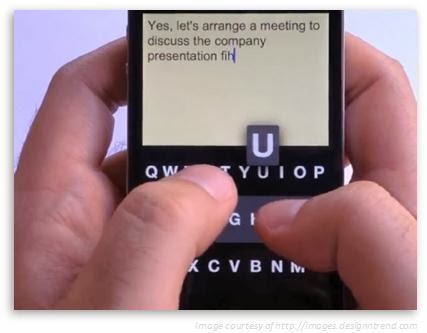
A new app is out and about that lets you type on your smartphone without looking at your screen. Meet Fleksy, a keyboard app now designed for both iOS and Android devices that's currently making trends in the app world since it was released. It is free for iOS users while for Android, you can download and use it for free on the first month, and then a one-time fee of $3.99 after. But what exactly is Fleksy and how do you use it?


Overview

According to Flexsy.com, Fleksy is an application that replaces your device's on-screen keyboard. Its features include a familiar QWERTY layout, sophisticated prediction, an autocorrect engine, a larger typing area where you can either use the traditional buttons like the spacebar or master the app's unique swipe-based system to space, delete, capitalize, and punctuate. This is why Fleksy claims that it can do several things better than iOS 7's default keyboard.
The following apps now implement the Fleksy keyboard:
  • Launch Center Pro - an application launcher with shortcuts for frequently accessed tasks
  • GV Connect - a Phone and SMS client for Google Voice users
  • BlindSquare - combines location and FourSquare information to assist virtually-impaired users in their daily lives
  • WordBox - clean and simple text editor
However, getting this app will not replace your entire keyboard experience on your device. Fleksy can only be used in individual apps and only for keyboards which app developers choose to support. Currently, Fleksy continues to work with other app developers for future integration of its keyboard to their apps.

How to Use It


First, install the Fleksy app from the iOS or Google Play Store, and then launch it on your device. Start typing as you would normally do on a regular keyboard, without worrying if you make a typo error. You will notice that the app will take care of the mistakes for you with its autocomplete engine. Now if you want to insert a space in between words or delete a word, you don't really need to look on the screen to do that. Just swipe to the right to insert a space or swipe to the left to delete a text or character. Swipe twice to the right if you need to insert a punctuation mark, such as a period or a comma, and then swipe down if you want to scroll through its suggested entries.

The app's excellent prediction enables it to guess the correct word that you want to type. It also has an ability to turn its keyboard to completely invisible if in case you need more typing space. Just tap the area where you think the letters are located as if the visible keyboard is still there and the results will still be accurately the same.


Tuesday, December 3, 2013

A Sneak Peak at car Force One: The Most High Tech Cab in New York Today

If you happen to be in New York, there's a good chance you'll get to see the hottest and coolest taxi cab there is...it's none other than the Car Force One. Sounds intimidating, right? And no, it's not the official car of President Barack Obama however, it is one ride that's fit for His Excellency. The Car Force One, which is founded and currently owned by Ishai (last name not revealed), is a luxury car service that transports you around New York along with tons of up-to-date amenities with no additional charge.

According to Ishai, his company's goal is to achieve full customer satisfaction. “My company is not about the car, it’s about the service. It’s for the clients,” said Ishai. Since July 2009, Ishai has been a cab driver and has been developing his vehicles with the help of his creative team. So what's in store with the most high-tech cab in New York? His 2011 Chevrolet SUV's loaded with gadgets such as an Xbox 360, which will be upgraded to Sony PlayStation 4 once it goes available, a 23-inch Samsung HD monitor, cable TV with premium HD channels, a Blu-Ray player, 4G Internet connection, a fully functioning laptop, refreshments, and the list goes on.


Ishai created the Car Force One with 3 visions in mind -- convenience and comfort, multimedia entertainment, and a fully-equipped mobile office. These are major plus points, especially for people in New York, who always do business even when traveling and wants everything done in a jiffy. And if you still can't get enough of the cool gadgets that you can possibly experience with this vehicle, here's a more elaborate list.

Convenience and Comfort
Multimedia Entertainment
Mobile Office
Chargers for iPhone 4, 4s, 5, 5c, 5s, Samsung and BlackBerry phones on every side/seat
23-inch full HD 1920 x 1080p monitor that’s hooked up for 5 different uses:
 - Internet, Blu-ray movies, live cable TV, gaming console and pictures and videos from SD card reader.
Fully functioning laptop hooked up to 23-inch monitor, wireless keyboard and mouse
Gaming console (Xbox 360 for now, he has already ordered PS4)
4G Wi-Fi that clients can connect to on their own devices
2 Power and 2 USB outlets in front 
Samsung Blu-ray player
3 mobile printers:
- 4 x 6 photo printer
- an all-in-one scanner/printer
- an HP OfficeJet printer
Climate control unit to adjust seat heaters, fan speed, car temperature and radio station tuner
Live cable TV (Time Warner) with premium channels such as Disney and HBO
Full-size wireless keyboard (held in place with Velcro)
Remote controls throughout car to adjust lighting on/off and dimming
2 headrest monitors hooked up to Blu-ray player
Wireless mouse (snaps in place with magnetic holder) 
Phone holders near charging cables on sides of car
Theater surround-sound system
Adjustable table as a writing surface that holds the keyboard and mouse
Cup holders
More than 200 titles of Blu- ray movies in a 2TB hard drive, an additional 30 titles for kids
SD card reader for memory card file transfer
Overhead vanity/”makeup” mirrors for every seat
Up-to-date magazines and newspapers

Mobile “bathroom,” as a client called it, side dock with:
- Victoria’s Secret lotions and colognes
- hand sanitizers
- Wet Ones to go
- Kleenex to go
Lights of 6 different colors:
- green in front for the flowers,
- purple
- blue
- red in third row for “It’s like Amsterdam back there”
- modified white interior car lights
- yellow adjustable reading light
- Strobe/party lights in bottom of middle row

3 coolers (2 for now) that serve as mini-bars, offering cold drinks such as:
- bottled water
- orange juice
- apple juice
- Diet Coke
- Sprite
- Coors Light
(Plans to add fruit salad cups)


Mobile baby station with:
- bottle warmer
- baby wipes warmer
- paper towels


Adjustable individual reading lights


Flowers (on the weekends)


Neck pillows, sleeping mask


2 full-size umbrellas, adding 2 smaller ones


Infant and toddler car seats and boosters


- First aid kit
- Emergency seat belt cutter
- Window breaker
- Fire extinguisher


Cleaning at car wash every 2 weeks


Dying to get a ride in the Car Force One? Reservations start at $45 for a trip from the Upper West Side to Wall Street, while shorter distances start at $35. Not a bad deal since the same trip will set you back some $30 in a regular yellow cab during moderate traffic, including a 20% tip. According to Ishai, a minimum fee for reservations is imposed because of the commitment it makes, as well as the opportunity cost involved. The company also doesn't charge cancellation or change fees. For regulars, he offers better rates and sometimes even offers free rides for short trips when he's not busy during his in-between client time.

Here's the catch, though. If you are planning to make a reservation of the Car Force One today and expect to get a ride the next day, then you're in for a huge disappointment. Making a reservation of the Car Force One should be done as early as possible because of its very tight schedule. The company receives bookings for March as early as 6-9 months before the book date. Most customers hire the company's high-tech vehicle for airport and business pickups.

You can make an online reservation by going to the Car Force One website, log in using the "carforceone" username and "president" as the password. You will be required to open an account for 15% off posted rates. Mr. Ishai is now planning of upgrading his gadgets with those that will be featured in the Consumer Electronics Show in Las Vegas, which he will be attending this coming January. Some of the upgrades he's planning to make are:
  • A 4K or 3D monitor (without glasses)
  • Wireless phone charging dock
  • A Karaoke machine
  • Heated or cool cup holders
  • A mousepad that can be used on the lap 
But what makes the Car Force One extra special, aside from its cool gadgets and complete amenities, is the reliability and customer service that the customer gets every time they avail of the company's service. Because of this, Ishai's regular customers grow in numbers, and he also gets to be their confidant for some! Although, for people who gets to see this awesome cab for the first time, it's the up-to-date technology that it offers is mainly the head-turner of New York's one and only, Car Force One.